
CoSC’s posting form provides a lot of information for players, but does require the individual initially creating the thread to provide a great deal of information. To help make this go smoother this guide intends to go over the various options is a bit of detail.
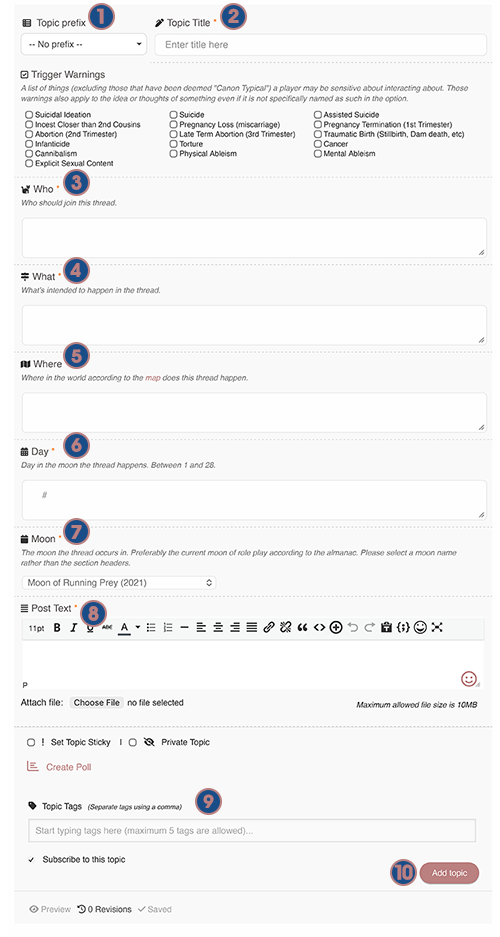
1: Topic Prefix – Select the prefix(s) that best describes the sort of thread this will be. Choices are:
- Open to Join: threads anyone can join.
- Private Thread: A thread limited to specific players.
- Ask to Join: Other players must ask prior to joining the thread.
- Plot Thread: This thread is directly related to the current game plot.
- Closed Thread: This thread has been completed.
- OOC Thread: A thread entirely out of character. Usually these are done by staff or leader players to announce general knowledge things that all players should know.
- Canon Story: A pre-written, self contained story that is entirely in character. These can be written by a player or group of players to cover an event they don’t have time to role-play. Best used to cover events you wish to record but are set in previous moons.
2: Topic Title – The title of the thread. Many players prefer to append [DAY-MOON-LAST 2 DIGITS OF MOON YEAR]. Example: [12RP21]
3: Trigger Warnings – If your thread contains any of the listed triggers please check the boxes of the ones that apply so that other players may self-police to avoid things that trigger them.
4: Who – List which characters will be in the threads. Many players choose to include something like “and Others” if the thread is open.
5: What – Describe what is intended to happen in the thread. This can be vague (example: Clan bonding) or specific (example: ‘Learning how to climb a tree without using claws’). If you desire something like a specific predator or dangerous prey you can ask the staff or check out or nifty guides (Predator, Prey, More).
6: Where – Where the thread takes place. Some examples include something as vague as ‘ThunderClan Camp’ or more specific such as ‘Leader’s Den, ThunderClan Camp’. Please consult the map for location details.
7: Day – The day of the moon your thread takes place in. It will be between 1 and 28. You can find the specific weather for each day of a moon using the Moons Guide.
8: Moon – The moon the thread takes place in. Usually the current moon is the one that comes up automatically, but other moons can be found in the dropdown menu. Please ensure you don’t select the section headers. Details on all moons can be found in the Moons Guide.
9: Post Text – The actual post! Players may opt for either plain text or decorative tables (more information on tables is available in the Table Use Guide).
10: Submit Button – The button to submit the post! Very important to remember to press that. We also advise that you backup your post prior to submitting in case the issues occur.
Written by Faux & Kitsufox January 2026